-1.png?width=500&height=125&name=PathSpot-Logo-RGB-Horizontal-1.0.0-1-e1600793653493%20(1)-1.png)
🌡️ As part of the PathSpot PowerTemp platform, we provide automated, HACCP-compliant temperature logging to help simplify food safety record-keeping. By automating temperature monitoring and documentation, PowerTemp helps reduce manual errors, eliminate missed temperature checks, and discourage inaccurate or backfilled ("pencil-whipped") records for critical food safety monitoring points. The result is more reliable documentation, improved operational consistency, and greater confidence in your HACCP compliance program.
If you'd like to learn more about enabling automated temperature logging for your organization, please contact your Customer Success Manager or reach out to PathSpot Support at support@pathspottech.com. Our team can provide additional information and help you get started with this functionality.
✍️ How to Sign Temperature Logs
📥 How to Download Reports
For a full Report PDF example click here
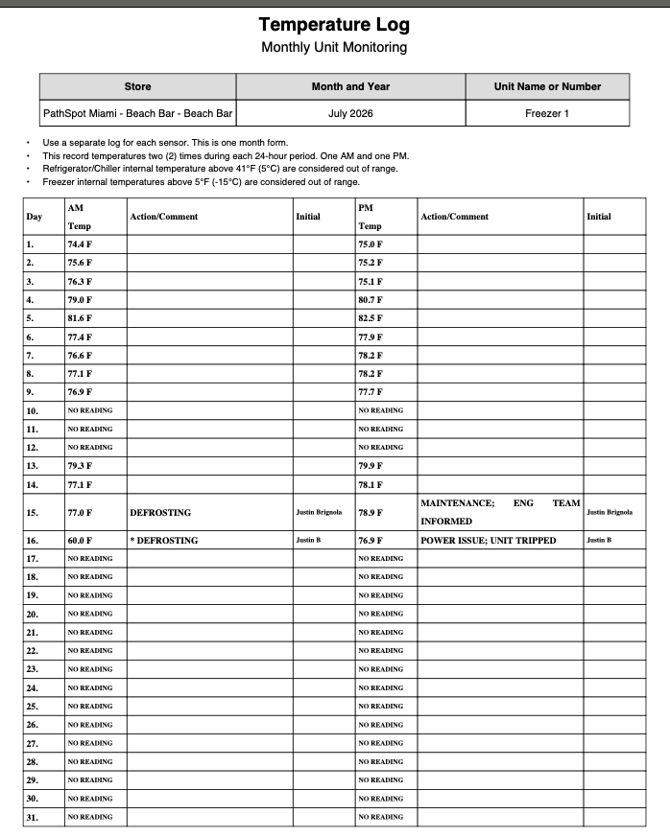
Temperature Pulling Logic:
1. If the Sensor is currently on alert at the time of signature: We select the first temperature and time value of when the sensor crossed into the alert threshold.
Example: If the sensor went on alert at 12:00pm we take that time and temperature.
2. If the Sensor is NOT currently on alert, but DID alert in the time and date range for the report: We select the first temperature and time of when the sensor first went on alert. We look at the most recent alert which is the highest criticality alert (highest temp limit).
Example: The sensor went on alert at 11:00am and was corrected before the AM period was over at 12pm. We would take the 11am time and temperature. We want you to know the sensor was out of range even if it is now fixed. This is where overriding and comments come in handy!
3. If the Sensor is OUT of range but has not been on alert for the time and date range for the report: We select the most recent data point where the sensor was NOT on alert.
Example: The sensor is out of range but not enough time has elapsed for it to be on alert -- i.e. at the time the AM report was generated a door was left open so it was out of range for just a few minutes. If that sensor continues to remain out of range the PM check will properly highlight it but the AM would not.
4. If the Sensor is not out of range and doesn’t have an alert: We look at the most recent temperature reading we have (within the past hour).
🗓️ Signing Previous Days
💡 Product Considerations
- ⭐ An asterisk (*) on Day 16 of the report example shown below indicates that the temperature was manually overridden. Actual feature shown in the example video in the "Download Report" Section Below
- ✍️ If a user re-signs a report, any newly downloaded version will display the most recent entry for that field.
- ⏳ Downloaded reports are cached. As a result, it may take up to one hour for changes to appear in a newly downloaded report if one was just downloaded and changes were made righ tafter. If you need an updated version immediately after making changes, allow up to an hour before downloading again.
- 📧 Upon request, your team can subscribe to automated HACCP compliant temperature reports (example below in "Download Report" Section. These reports are delivered to your inbox on the first day of each month and include the previous month's temperature records and signatures. If any days were missed, the report serves as a helpful reminder to return to the PathSpot dashboard, complete the missing signatures, and download an updated report.
- 📡 If a sensor goes offline, it will automatically backfill up to 21 days of temperature data once it reconnects. That said, this historical data will not appear on the Log form if the day has already passed. The backfilled data will be available for download as a CSV file through the Time Over Temperature graphs. For any day when the sensor was not connected and no data was recorded, the corresponding day will display “No Data Available” for that sensor.