-1.png?width=500&height=125&name=PathSpot-Logo-RGB-Horizontal-1.0.0-1-e1600793653493%20(1)-1.png)
We recommend installing one hand scanner at each designated handwashing sink. Designated sinks provide the most effective checkpoint for monitoring handwashing compliance prior to food handling.
Three aspects should be evaluated when installing the scanner. If each criterion is met, the installation is considered successful:
- 📍 Placement: Includes accessibility for employees and appropriate distance from the sink. A shorter distance between the sink and the scanner improves compliance. Placement should accommodate employees of all heights and arm lengths.
- 📸 Environment: The scanner’s immediate surroundings, especially the area beneath the camera should be clear of debris and free from obstructions. The scanner should not interfere with day-to-day activities or be positioned where it is likely to be hit. Consistency is key; a stable environment ensures optimal device performance.
- 🔌 Cable Management: Cables should be secured, organized, and positioned so they do not create safety hazards. It is also recommended to use surge-protected outlets to help protect against excessive voltage, power surges, and short circuits.
⚡ HandScanner Activation:
- Please note: Upon arrival, the tablet's battery may be fully drained. If you see the purple lights illuminate under the scanner when hands are placed, the outlet is functioning, and the tablet is charging. Allow the tablet to charge for a few hours, then unplug and replug the device to initiate the boot up process. If the tablet still does not power on, an overnight charge may be required.
Installation Examples
Optimal
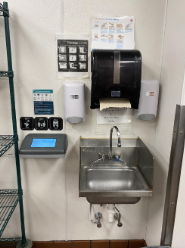
Installations that meet all evaluation criteria, including proper placement, clean cable management, and clear visual cues. The scanner is easily accessible, positioned at an appropriate distance from the sink, and immediately visible to employees.
🟢 Placement 🟢 Environment 🟢 Clean Cable Management
📝 Score Justification: Positioned directly next to the sink, with no visible wires and a clean, unobstructed environment beneath the scanner.
🔧 Suggestion: None, this is a perfect install!
Acceptable
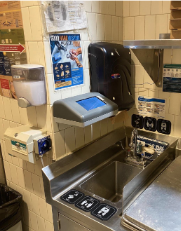
Installations that meet most criteria but may have minor limitations that do not impact functionality. Placement is still usable, cables are managed but not ideal, and visual cues are present but could be improved.
🟡 Placement 🟡 Environment 🟢 Clean Cable Management
📝 Score Justification: The current scanner placement makes the screen difficult to read. Employees must twist their bodies to achieve the correct angle for the camera, which reduces usability and compliance.
🔧 Suggestion: Move the soap dispenser next to the paper towel dispenser and relocate the HandScanner to the front wall.
🟡 Placement 🟢 Environment 🟢 Clean Cable Management
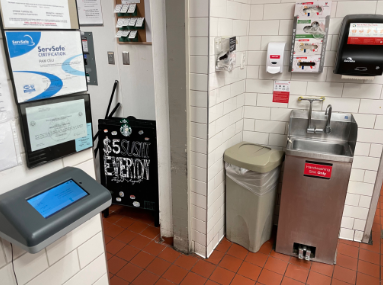
📝 Score Justification: Given the environmental constraints, this is the most optimal location for the scanner if this is the only sink. Not every environment allows for a perfect installation; however, this placement represents the best possible solution and still enables employees to wash their hands and, with a quick pivot, use the scanner efficiently.
🔧 Suggestion: As far as placement no suggestions given the circumstances. That said, there should be PathSpot approved visuals and FAQ's near the scanner to help with training & adoption.
Suboptimal
Installations that fail to meet one or more key criteria. These may include poor placement, excessive distance from the sink, unsafe or cluttered cable management, or lack of clear visual cues, which can reduce compliance or usability.
🔴 Placement 🔴 Environment 🔴 Clean Cable Management
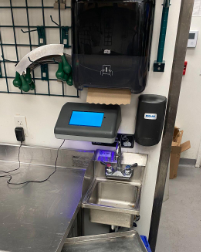
📝 Score Justification: The scanner is positioned too close to the table, causing the proximity sensor and indicator lights to remain on continuously. The power cord is also obstructing the area. Depending on the tasks performed on this table, this setup may not only affect aesthetics but could also create potential food safety concerns.
🔧 Suggestion: A rearrangement of the paper towel and soap dispenser is needed. For cord management, all boxes include a variety of accessories to neatly bundle or secure wires along seams.
🔴 Placement 🟡 Environment 🟡 Clean Cable Management
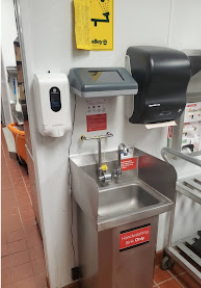
📝 Score Justification: This example illustrates that not all criteria are weighted equally. Even if the environment and cable management are acceptable or optimal, if the scanner’s placement makes it difficult or impossible for employees to use, the entire installation should be considered suboptimal.
🔧 Suggestion: Move the scanner down 6 inches to allow employees of all heights to comfortably position their hands 6–8 inches below the camera.
🔴 Placement 🔴 Environment 🟢 Clean Cable Management
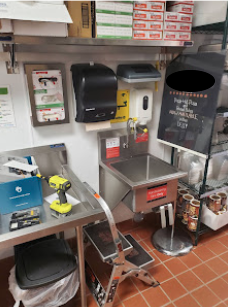
📝 Score Justification: Despite a "clean" install, the scanner is positioned too high for most employees, and there is virtually no clearance between the scanner, the soap dispenser, and the screen on the shelf above.
🔧 Suggestion: When wall space is at a premium, it is best to remove everything and start with a clean canvas. Once the wall is cleared, it becomes much easier to reinstall items in a way that allows for proper spacing.