-1.png?width=500&height=125&name=PathSpot-Logo-RGB-Horizontal-1.0.0-1-e1600793653493%20(1)-1.png)
✅ Prerequisites
Before proceeding, confirm you have the following:
-
An active PathSpot account.
-
The appropriate permissions (Admin or Manager roles typically have access to these features).
> Learn more about goal compliance here
🛠️Setup Instructions
Without guidance from a PathSpot support member, we recommend disabling Advanced Shift Scheduling when setting goals (as seen in the video below).
This will allow you to set daily goals using a simple calculation:
Expected handwashes per person × total working hours per day 🧼✋
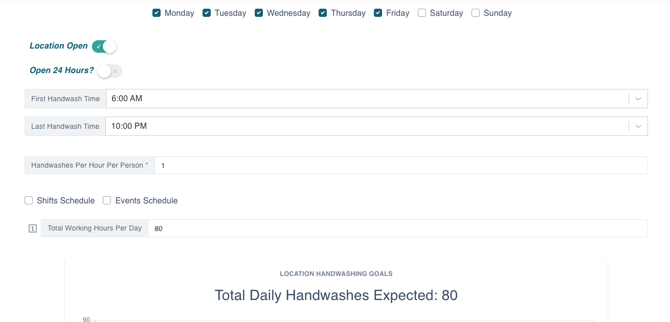
In the example shown in the image below, the brand expects one handwash every 1 hour ⏱️, and the total number of working hours per day is 80.
This could represent 8 employees working 8 hours per day, Monday–Friday 🗓️. Think of total working hours as the combined hours worked by all employees for that day.
- Note that putting 0.5 hours in the handwashes per hour field would equate to 30 minutes
You can deselect certain days ❌ and create unique target goals and time thresholds as needed.
Reporting: All handwashing events, regardless of timing—are stored in your PathSpot dashboard 📊. However, only handwashes that occur within the time frame set on your Goals page will appear in the daily on-screen tracker and in your daily and weekly reporting 📈.
When finished, click Save in the top left corner of the screen 💾.
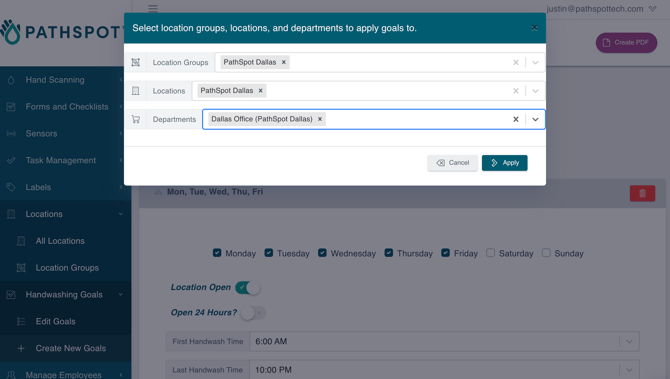
The save function lets you apply your goals to an individual location, a location group (multiple stores), or individual departments, as shown in the image below
Video Guidance
✏️ You can edit goals in the same nested tab ascreate them