-1.png?width=500&height=125&name=PathSpot-Logo-RGB-Horizontal-1.0.0-1-e1600793653493%20(1)-1.png)
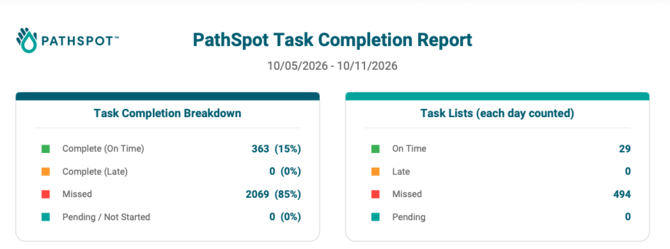
📊 Aggregate Totals
The top section provides a quick overview of task completion percentages by status: Complete, Late, Missed, and Pending. It also displays the total number of tasks in each category, giving you a high-level snapshot of overall task performance.
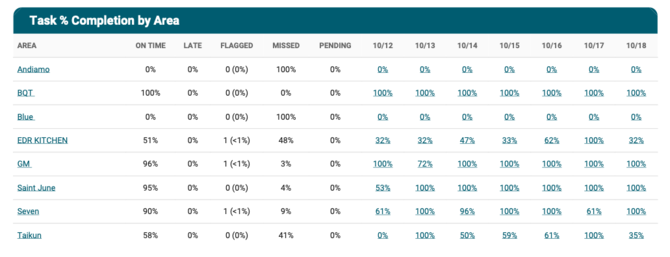
🏢 Task % Completion by Area
This section is designed for properties with multiple departments under one location or multiple locations under a single property. It provides a breakdown of task completion statuses by day for each area, making it easy to compare performance across departments or locations.
📅 Daily Task List % Completion
For a more granular view, this section breaks down daily completion percentages by individual task list type. It helps you track how consistently specific task lists are completed each day.
Example: Review the team's daily completion rates for the Cooking/Reheating Log to identify trends and monitor consistency.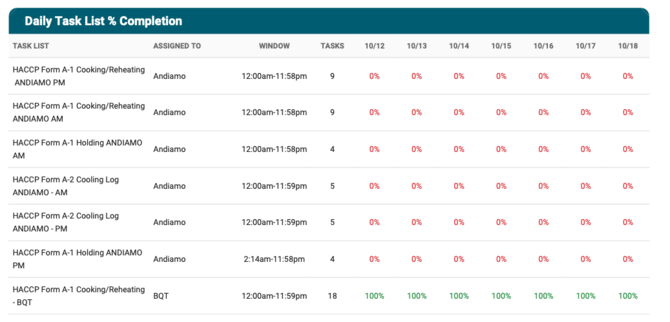
⚡ One-Time Task List Completions
Similar to the Daily Task List section, this section focuses specifically on task lists assigned in real time through the app's ad hoc task function. It provides visibility into the completion of tasks created and assigned as needed, rather than as part of a recurring schedule.
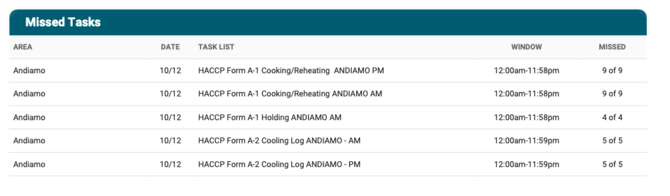
🚩 Missed Tasks
This section identifies task lists that were not 100% complete by the end of the week. Use this view to identify outstanding tasks, review missed requirements, and follow up with the appropriate team members.